Tropical heat: can your radio station stay on the air?
Sun, 21 JunThe forecast for the Netherlands and Belgium leaves little room for doubt: tropical heat is on the way. In many places, temperatures may climb well above 30 degrees Celsius over the next few days.
For listeners, that sounds like summer. For radio stations, it means one thing above all: pay attention.
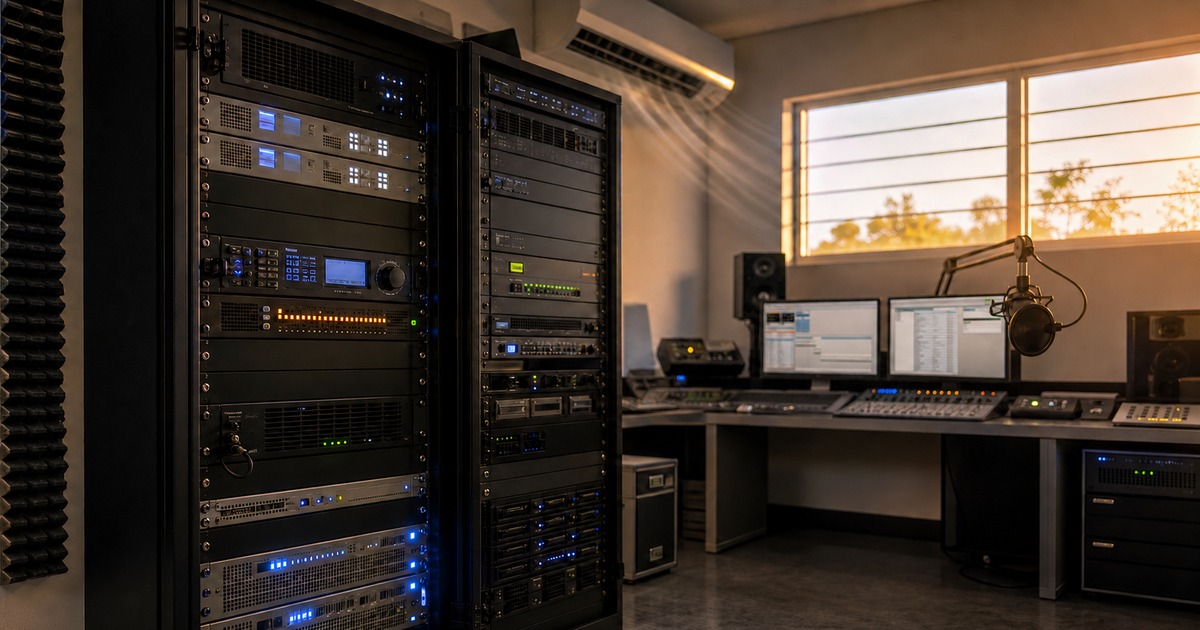
A warm studio is uncomfortable, but a warm equipment room can become a real problem. Transmitters, audio processors, switches, stream encoders, UPS units, servers, and playout computers are built to run reliably, but not to absorb endless extra heat, dust, and poor ventilation.
And summer is exactly when staffing is often lighter than usual.
Heat turns small issues into big problems
Professional broadcast equipment can handle a lot. Still, heat rarely shows up as one big problem out of nowhere. It usually starts small.
A fan that has been struggling for weeks. A dusty air filter. A rack where hot air cannot escape properly. A studio PC that has not been opened in years. An equipment room that runs much hotter than anyone in the studio realizes.
Equipment produces heat by itself. Put that equipment in a small room, under a flat roof, in a crowded rack, or next to other heat sources, and the temperature can build up quickly. Air conditioning that is normally just good enough may suddenly fall short during a run of tropical days.
Then there is dust. Dust collects exactly where air needs to move: vents, heat sinks, power supplies, filters, PC fans, and rack doors. Even a thin layer of dust acts as insulation. A clogged filter or slow fan can make equipment run hotter, throttle back, become unstable, or eventually fail.
With transmitters and other professional broadcast equipment, cooling is not a detail. It is part of reliability.
Summer is the perfect time for failures
Failures almost never happen at a convenient moment.
During the summer, engineers are on vacation, many stations run with a smaller crew, and there is not always someone available to drive to the studio right away. The person with the key may be away. The volunteer who normally checks things may be unreachable. The presenter who usually fixes the automation may be by the pool.
Meanwhile, listeners simply expect the broadcast to continue.
A frozen automation PC, a missing audio source, or a network issue does not have to become a disaster anymore. But you do need to see what is happening quickly, know who is allowed to take action, and make sure the broadcast is not fully dependent on someone physically going to the studio.
A quick heat check for your radio station
Go through these points before the hottest days arrive:
- Check the temperature in the equipment room, not just in the studio.
- Make sure air conditioning or ventilation is actually running, and that hot air can leave the room.
- Check that racks have enough airflow at the front and rear.
- Clean air filters, vents, and grilles.
- Check that fans sound and look normal.
- Clean transmitters, audio processors, and playout computers according to the manufacturer's instructions.
- Check UPS units and power supplies, because batteries do not like heat either.
- Look for temperature warnings on servers, NAS systems, and network equipment.
- Test stream encoders, RDS/metadata, codecs, and external sources.
- Make sure a fallback or emergency playlist is ready.
Use compressed air or a compressor with care. Do not blow dust deeper into the equipment, do not let fans spin uncontrolled at extreme speeds, and be careful with static electricity. When in doubt, shut equipment down in a controlled way and have maintenance performed by someone who knows the gear.
Do not forget the on-air computer
The transmitter often gets the most attention, but the playout computer is just as critical.
A PC in a warm studio or equipment room pulls in dust for months. The CPU cooler, power supply, and vents can slowly clog up without anyone noticing. A struggling computer does not always give a clear warning. Sometimes it starts with slow response times, audio glitches, or an unexpected restart. Sometimes it simply stops broadcasting reliably.
Check:
- whether Windows Updates could force a restart in the middle of a hot vacation week;
- whether the audio interface and drivers are stable;
- whether the database and audio storage remain available;
- whether backups are recent;
- whether automation resumes correctly after a restart;
- whether stream output, metadata, and external sources have been tested.
The real question is not only whether everything works right now. The real question is: will it still work when nobody is nearby?
Modern radio no longer runs only from the studio
Ten years ago, almost every failure had to be solved on site. Today, presenters, engineers, and station managers expect to be able to monitor and take action remotely.
From home. From a campsite. Or from a vacation address.
Not because it is a luxury, but because radio depends on continuity. Listeners do not know that it is 35 degrees Celsius in the equipment room. They only notice whether the broadcast stays on the air.
That is why more radio stations are investing not only in reliable hardware, but also in smart automation, good preparation, and remote management.
A failure rarely appears completely out of nowhere. There are often signs:
- an audio source disappears;
- a playout system becomes slow to respond;
- a computer restarts unexpectedly;
- a live connection does not come up;
- metadata gets stuck;
- a presenter cannot log in from a remote location.
The difference between a small incident and hours of silence often comes down to one thing: how quickly the problem is noticed, and how easily someone can step in.
Power Studio brings calm when heat and vacation season overlap
Power Studio will not fix a broken air conditioner or clean a dusty transmitter filter. That maintenance still matters.
But Power Studio does make a radio station less dependent on last-minute improvisation at the worst possible moment.
With Power Studio, you can plan programming ahead, generate playlists, keep hours running automatically, use live assist when someone is in the studio, prepare voice tracks, load cart players, and keep metadata publishing properly. External sources and fixed workflows can be prepared in advance, so the broadcast does not fall silent the moment the studio is empty.
That means:
- programs can continue automatically;
- emergency hours and vacation programming can be prepared ahead of time;
- live and external sources are better prepared;
- team members can monitor and respond more effectively from a distance;
- the station is less dependent on someone being physically present in the studio.
During heat waves and vacation periods, that brings peace of mind. Not because software beats the weather, but because good automation prevents every small issue from becoming an urgent drive to a hot studio.
A heat wave may last a week. Summer lasts for months.
The best preparation is therefore not only a clean equipment room and working cooling, but also a broadcast that can keep running when people are not nearby.
In the end, it is not about the temperature outside.
It is about making sure your listeners never notice what is happening inside.
Want to learn more about reliable unattended playout, vacation planning, and automation? Explore the Power Studio features or contact us for advice on a practical setup.